0 ratings




Item #:
244022711
SCREENARAMA New Screen Replacement for Lenovo FRU 5D10W69517 PN SD10W69527
90% of respondents would recommend this to a friend
Item #:
244022711
XCD 197
Price Details
Excluding Shipping & Custom charges ( Shipping and custom charges will be calculated on checkout )
*All items will import from US
In stock
 Imported from USA store
QTY:
Order now and get it around Sunday, September 13
Secured transaction
Ubuy works hard to protect your security and privacy. Our advanced payment security system ensures confidentiality by encrypting your information during transmission using AES (Advanced Encryption Standards) and SSL (Secure Socket Layer) protocols. Your payment details are 100% secure as we do not share your payment details with third party sellers.
Our Top Logistics Partners


Designed for DIY installation with included tools.

Fast
Shipping

Free
Return*

Secure Packaging

100% Original Products

PCI DSS Compliance

ISO 27001 Certified



Note: Step Down Voltage Transformer required for using electronics products of US store (110-120). Recommended power converters Buy Now.


Product Details
| Manufacturer | SCREENARAMA |
| Item model number | Lenovo FRU 5D10W69517 PN SD10W69527 |
| Date First Available | September 6, 2023 |
| Item Weight | 1.5 lbs (680 grams) |
Product Description
Have any Query? Chat with us
Customer Questions & Answers
-
Question:
What devices are compatible with the SCREENARAMA New Screen Replacement for Lenovo FRU 5D10W69517?
Answer: The SCREENARAMA New Screen Replacement is specifically designed for select Lenovo laptops that use the FRU number 5D10W69517 and the part number SD10W69527. This ensures a perfect fit and functionality. Confirm compatibility with your model by cross-referencing your device specifications or checking with your retailer to ensure that your Lenovo laptop supports this screen replacement. -
Question:
How do I install the SCREENARAMA New Screen Replacement?
Answer: Installation of the SCREENARAMA New Screen Replacement requires careful handling and appropriate tools, typically a small screwdriver set. Firstly, power down and unplug your laptop. Remove the bezel and disconnect the old screen carefully. Connect the new screen, ensuring all cables are secure, and carefully reassemble the device. For best results, follow a step-by-step guide or watch an installation video tailored to your Lenovo model to avoid mishaps. -
Question:
Is the SCREENARAMA screen replacement an original Lenovo part?
Answer: No, the SCREENARAMA New Screen Replacement is an aftermarket product designed to meet or exceed OEM specifications. While it may not be an original Lenovo part, it is constructed using quality materials, ensuring reliable performance. Aftermarket replacements can offer comparable quality at a lower cost, making them a worthwhile option for users needing a screen repair without investing in expensive OEM parts. -
Question:
What are the signs I need to replace my laptop screen?
Answer: If your screen is displaying flickering images, has dead pixels, or is completely black, it may be time for a replacement. Physical damage such as cracks or significant scratches can also indicate the need for a new screen. Additionally, if you notice areas of discoloration or glitches on the screen, these issues can affect your overall laptop experience, prompting a timely replacement. -
Question:
What tools do I need to replace the screen?
Answer: To successfully replace the SCREENARAMA New Screen Replacement, you'll typically need a precision screwdriver set, a plastic spudger or card, and possibly tweezers to handle small components. Additional items like anti-static wrist straps and a soft cloth can also be helpful to avoid damage to sensitive parts. Having the right tools ensures a smoother installation process and minimizes the risk of damaging your device. -
Question:
Will replacing my screen fix display issues?
Answer: Replacing your laptop screen with the SCREENARAMA New Screen Replacement can resolve many display issues, such as flickering, discoloration, or physical damage. If these problems are caused by screen malfunction rather than internal hardware issues like the graphics card, a new screen will restore functionality. However, it's essential to ensure that the root cause of the display problems is indeed the screen before proceeding with replacement. -
Question:
How can I ensure the longevity of my new screen?
Answer: To prolong the life of your new SCREENARAMA screen, handle your device carefully, avoid placing excessive pressure on the laptop surface, and keep it clean from dust and debris. Investing in a quality laptop case can also provide additional protection. Regularly updating your laptop's software can prevent display driver issues, and you'll want to avoid exposing your screen to extreme temperatures or moisture to maximize longevity. -
Question:
What warranty or support is offered with this screen replacement?
Answer: While specific warranty details may vary by retailer, the SCREENARAMA New Screen Replacement typically comes with a warranty that covers defects in materials and workmanship. Some retailers also offer customer support services, which can be beneficial if you encounter issues during installation or usage. It’s advisable to check with the vendor for particular terms and conditions regarding warranty and support so you’re fully informed. -
Question:
Can I replace the screen myself, or should I seek professional help?
Answer: Replacing the SCREENARAMA New Screen Replacement can be a DIY project if you have some technical skills and comfort with electronics. However, if you feel unsure about the process, enlisting a professional technician can ensure a proper installation without risking further damage. Consider your comfort level with tools and assembly when deciding whether to tackle the project yourself or seek expert assistance. -
Question:
Where can I buy SCREENARAMA New Screen Replacement for Lenovo FRU 5D10W69517 in Montserrat?
Answer: You can buy the SCREENARAMA New Screen Replacement for Lenovo FRU 5D10W69517 from Ubuy in Montserrat. Ubuy provides a convenient online shopping platform, often featuring a wide range of products, including screen replacements. Shopping from Ubuy can ensure you find the exact replacement part you need for your Lenovo device.
SCREENARAMA Replacement Screens Lenovo FRU 5D10W69517 PN SD10W69527 Editorial Review
SCREENARAMA New Screen Replacement for Lenovo FRU 5D10W69517 PN SD10W69527 is a high-quality solution for those in need of a screen replacement. Weighing only 1.5 lbs, this product is designed to provide an easy and effective fix for your Lenovo device. With its specific model compatibility, it ensures a perfect fit and functioning just like the original screen. Users have praised the product for its reliability and ease of installation, making it a popular choice among customers looking for an effective restoration to their laptop's display. It's ideal for anyone aiming to bring their device back to life with minimal hassle.
Customer Reviews & Ratings
1 customers ratings
-
5 Star
100%
-
4 Star
0%
-
3 Star
0%
-
2 Star
0%
-
1 Star
0%
Review this product
Share your thoughts with other customers
Pros
- Compatible with Lenovo FRU models
- Lightweight at 1.5 lbs
- Easy installation process
- Durable and reliable design
- Restores device functionality
Cons
- Limited availability outside the US
Platform Trust & Buyer Confidence

JG
Jazz
Verified buyer
“Easy to use and always helpful and sorts any issues I've had past and present”
1 September 2026 · via Trustpilot
EK
Emmanuel
Verified buyer
“I always receive support when I engage customer service. Overall my experience with UBUY has been top notch. Keep up the good work.”
31 August 2026 · via Trustpilot
F
fnd
Verified buyer
“The delivery was fast and the product came undamaged and authentic.”
29 August 2026 · via Trustpilot
LC
Leana
Verified buyer
“Ubuy is extremely efficient and to order online is an easy process. The verity of products to buy is really unlimited! My order was urgent and I got it on time. The products are great! Thank you Ubuy!”
25 August 2026 · via Trustpilot
HL
Hengo
Verified buyer
“Fast, convenient and cheap. Great store!”
27 August 2026 · via Trustpilot
Secure Checkout
Global Delivery
Easy Returns
Genuine Products
Product Price History
Important information
- Limitations : For products shipped internationally, please note that any manufacturer warranty may not be valid; manufacturer service options may not be available; product manuals, instructions, and safety warnings may not be in destination country languages; the products (and accompanying materials) may not be designed in accordance with destination country standards, specifications, and labeling requirements; and the products may not conform to destination country voltage and other electrical standards (requiring use of an adapter or converter if appropriate). The recipient is responsible for assuring that the product can be lawfully imported to the destination country. When ordering from Ubuy or its affiliates, the recipient is the importer of record and must comply with all laws and regulations of the destination country.
- Not all the products listed on Ubuy are for sale, as Ubuy is a global search engine. Products are subject to export/trade regulations.
XCD 197
Order now and get it around Sunday, September 13
This item is not restrict in my country.(Please click on above link if this item is not restrict in your country, So our team will review and allow.)
QTY:
Secured transaction
PCI DSS compliant and ISO 27001:2022 certified, with encrypted payments and full buyer protection on every order.
Our Top Logistics Partners
Fastest cross-border delivery
Features & Benefits
- Easy DIY installation with all necessary tools included.
- IPS Wide View Matte finish enhances viewing angles and reduces glare.
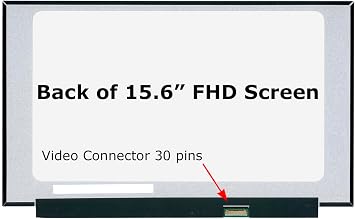
- Compatible with 1920x1080 FHD resolution for clear visuals.
- Features a 30-pin connector for quick installation.
- Ideal for non-touch laptops, ensuring seamless compatibility.
- Verify that your original screen matches these specifications.
Ubuy Assurance
Experience worry-free shopping with 100% original products, PCI DSS-compliant payment security, ISO 27001-certified data protection, the fastest cross-border delivery, free returns *, and secure packaging on every order.