- Home Page /
- Electronics /
- Home Audio /
- Home Audio Accessories /
- Distribution /
- Selector Switch Boxes /
- Osee GoStream Deck Pro 4-Ch HDMI Live Streami...
0 ratings







Item #:
77675051
Osee GoStream Deck Pro 4-Ch HDMI Live Streaming Video Mixer Switcher
88% of respondents would recommend this to a friend
Item #:
77675051
XCD 1004
Price Details
Excluding Shipping & Custom charges ( Shipping and custom charges will be calculated on checkout )
*All items will import from US
0 ratings
Write a review
In stock
 Imported from USA store
QTY:
Only 10 items left in stock.
Order now and get it around Saturday, October 10
Secured transaction
Ubuy works hard to protect your security and privacy. Our advanced payment security system ensures confidentiality by encrypting your information during transmission using AES (Advanced Encryption Standards) and SSL (Secure Socket Layer) protocols. Your payment details are 100% secure as we do not share your payment details with third party sellers.
Our Top Logistics Partners


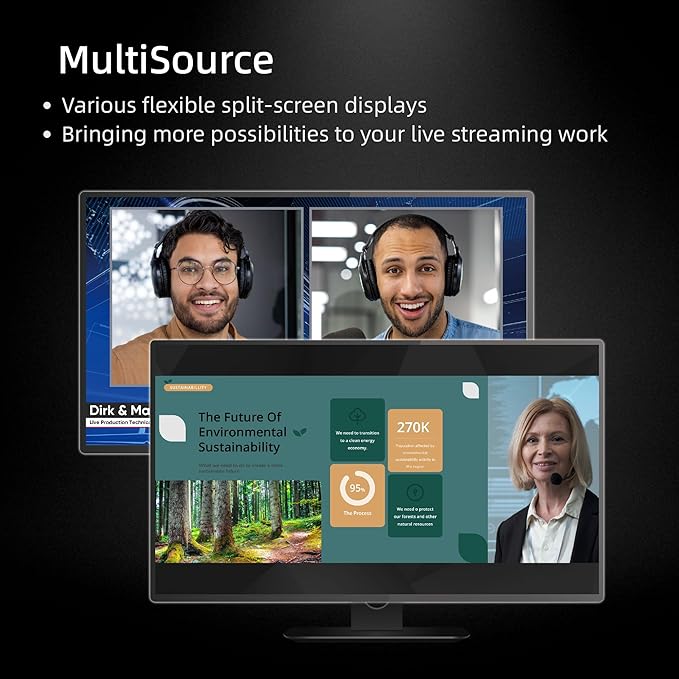
Unparalleled super source function for dynamic and engaging visual content

Fast
Shipping

Free
Return*

Secure Packaging

100% Original Products

PCI DSS Compliance

ISO 27001 Certified



Note: Step Down Voltage Transformer required for using electronics products of US store (110-120). Recommended power converters Buy Now.


What Stands Out
Multiple Inputs
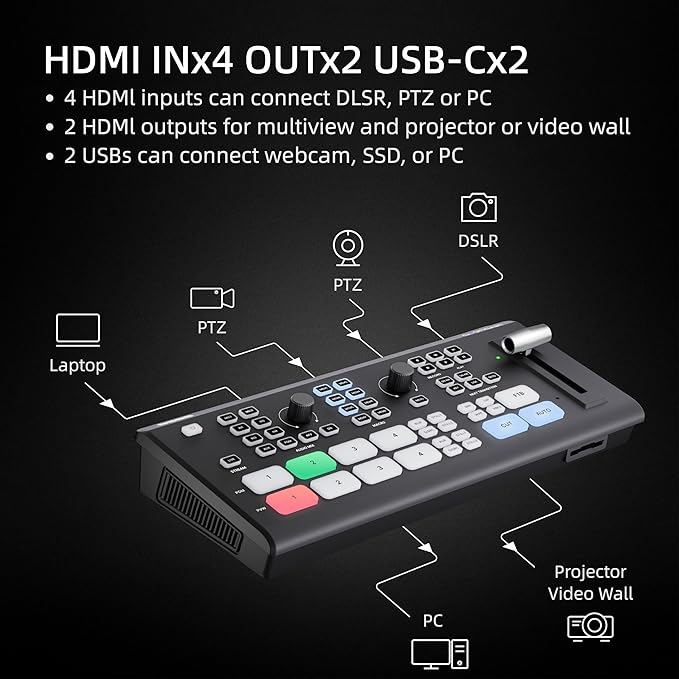
With 6 HDMI and 2 USB inputs, this switcher allows seamless integration of various video sources, enhancing live streaming setups without the need for extra equipment.
Simultaneous Streaming
Stream three different outputs at once, making it effortless to engage different audience segments simultaneously, while maximizing reach and interaction during live broadcasts.
Custom Macros
Eight programmable macro buttons enable quick transitions and custom commands, simplifying the production process and enhancing the creativity of live events and presentations.
Product Details
| Product Dimensions (L x W x H) | 4.2 x 9.9 x 1.9 inches (10.7 x 25.1 x 4.8 cm) |
| Item Weight | 1.1 pounds (500 grams) |
| Manufacturer | Osee |
| Item model number | C2 |
| Date First Available | July 12, 2023 |
Who Should Buy?

-
Live Streamers
Ideal for creators needing to manage multiple video sources seamlessly during live broadcasts, enhancing viewer engagement.
-
Event Producers
Perfect for professionals managing live events, allowing for smooth transitions and the presentation of various video feeds.
-
Content Creators
Great for YouTubers or podcasters who want advanced video production features to elevate their content quality significantly.

-
Beginners
Overly complex for novice users, requiring advanced technical skills that may discourage those new to video production.
Product Description
About This Item
Introducing the Osee GoStream Deck Pro, the ultimate portable multi-format live streaming video mixer switcher. With its unrivaled versatility and advanced features, this deck is a game-changer for content creation and seamless live streaming. Equipped with 6 HDMI and 2 USB ports, the Osee GoStream Deck Pro allows you to connect multiple devices simultaneously, providing a hassle-free workflow. Whether you're a professional content creator or an e-commerce enthusiast, this powerful tool will elevate your production quality to new heights. Designed with ease of use in mind, the Osee GoStream Deck Pro offers intuitive controls and a user-friendly interface.
You can effortlessly switch between different sources, adjust audio levels, and control various aspects of your live stream, giving you full control over your content creation process. One of the standout features of the Osee GoStream Deck Pro is its NDI updatable capabilities. This means that you can easily update the device with the latest NDI technology, ensuring compatibility with the latest streaming standards and future-proofing your investment. But the Osee GoStream Deck Pro is not just about functionality, it also delivers impeccable performance. With its advanced processing power, this deck allows for seamless video transitions, smooth audio mixing, and crystal-clear visuals, ensuring that your audience gets the best streaming experience possible. In addition to its impressive performance, the Osee GoStream Deck Pro offers a range of benefits.
From its compact and portable design to its robust construction, this deck is built to withstand the demands of professional use. Plus, its compatibility with popular streaming platforms and software makes it an ideal choice for any content creator or streaming enthusiast. So why wait? Experience the power and convenience of the Osee GoStream Deck Pro and take your live streaming to the next level. With its advanced features, intuitive controls, and exceptional performance, this deck is a must-have for anyone serious about content creation and e-commerce.
Buy online now and unlock endless possibilities for your streaming journey.
Have any Query? Chat with us
Customer Questions & Answers
-
Question:
How to Shop Osee GoStream Deck Pro 4-Ch HDMI Live Streaming Online From Ubuy?
Answer: It’s easy to shop Osee GoStream Deck Pro 4-Ch HDMI Live Streaming online from Ubuy. You just have to search for the product, choose your shipping method while checking out and get it delivered to your location. -
Question:
Is Osee GoStream Deck Pro 4-Ch HDMI Live Streaming Available to Shop Online in Montserrat?
Answer: Yes, at Ubuy Montserrat this product is available for you to shop at a reasonable price. The Osee GoStream Deck Pro 4-Ch HDMI Live Streaming is not available locally but you can trust us with our express shipping services. -
Question:
How Long Does It Take to Get Product After Placing the Order?
Answer: The delivery time of your ordered product varies as per what you've ordered and the shipping method that you've chosen. The estimated delivery time is mentioned during the checkout process, so be carefree while shopping.
osee Selector Switch Boxes C2 Editorial Review

Osee GoStream Deck Pro 4-Ch HDMI Live Streaming Video Mixer Switcher delivers impressive features including direct SD card recording while streaming via USB and supports streaming across three platforms with four HDMI and USB camera inputs. Users appreciate its usability, especially in settings like churches or events, and while some reported it can get hot during operation, they have found innovative ways to manage it. The switcher effectively replaces other models, proving to be a solid choice for those transitioning from higher-end equipment. However, buyers should be cautious about the HDMI version if they seek advanced NDI functionality as it requires an additional purchase for the feature.
Customer Reviews & Ratings
71 customers ratings
-
5 Star
77%
-
4 Star
14%
-
3 Star
1%
-
2 Star
5%
-
1 Star
3%
Review this product
Share your thoughts with other customers
Pros
- Compact design fits easily in most setups
- Lightweight for portability and convenience
- Direct SD card recording enhances streaming capabilities
- Reliable for basic switching during live events
- Great performance for the price point
Cons
- Minor stutter reported under heavy processing load
Product Price History
Important information
- Limitations : For products shipped internationally, please note that any manufacturer warranty may not be valid; manufacturer service options may not be available; product manuals, instructions, and safety warnings may not be in destination country languages; the products (and accompanying materials) may not be designed in accordance with destination country standards, specifications, and labeling requirements; and the products may not conform to destination country voltage and other electrical standards (requiring use of an adapter or converter if appropriate). The recipient is responsible for assuring that the product can be lawfully imported to the destination country. When ordering from Ubuy or its affiliates, the recipient is the importer of record and must comply with all laws and regulations of the destination country.
- Not all the products listed on Ubuy are for sale, as Ubuy is a global search engine. Products are subject to export/trade regulations.
XCD 1004
Order now and get it around Saturday, October 10
This item is not restrict in my country.(Please click on above link if this item is not restrict in your country, So our team will review and allow.)
QTY:
Only 10 items left in stock.
Secured transaction
PCI DSS compliant and ISO 27001:2022 certified, with encrypted payments and full buyer protection on every order.
Our Top Logistics Partners
Fastest cross-border delivery
Features & Benefits
- Osee GoStream Deck Pro offers unmatched super source function
- Provides dynamic and engaging visual content
- Multiple HDMI and USB ports for maximum flexibility
- Built-in audio mixer and earphone jack monitoring for top-notch audio quality
- Enhanced video effects with chroma keyers, downstream keyers, and upstream keyers
- Upgrading to the newest firmware version is recommended
Ubuy Assurance
Experience worry-free shopping with 100% original products, PCI DSS-compliant payment security, ISO 27001-certified data protection, the fastest cross-border delivery, free returns *, and secure packaging on every order.